Glyph
An emoji picker that opens where you're already typing. Press ;, type a few letters, press Return. No panel to hunt for.
Part of the Mac suite · in private beta — ask for a build
For Macs with Apple silicon running macOS 15 or later. Updates install automatically.
What it does
- Opens where you're typing. Type
;and a small picker appears right next to your text.⌃⌥Eopens it from anywhere. - Your semicolon still works. Press Escape and the picker disappears, leaving the
;you typed. - Search that understands you. Look up an emoji by its name or by what you mean:
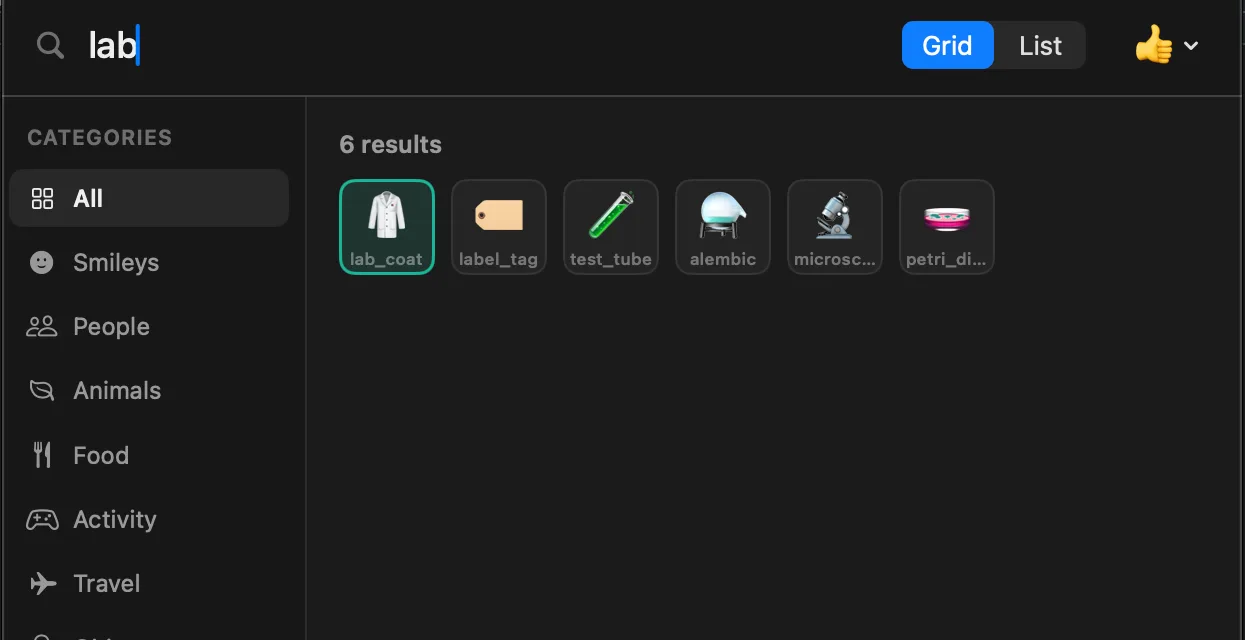
labandscienceboth find 🧪. - Learns what you use. The emoji you pick often and recently move to the top, so the one you always use for
raisecomes first. - Faster with shortcuts. Hold ⌘ to number the top results and pick one with
⌘1to⌘9. - Your way. Grid or list view, recents, favorites, a default skin tone, apps where Glyph stays off, and launch at login.
- Leaves your clipboard alone. Emoji go straight into your text, so whatever you copied is still there. It works in terminal apps too.
Privacy
Your recents and favorites stay on your Mac. Search works offline and results appear instantly.
Glyph asks for Accessibility access so it can notice the ; and add emoji in other apps. A short guide on first launch shows you how to turn it on.